How to Start a WiFi Hotspot Business in Kenya (2026 Guide)
To start a WiFi hotspot business in Kenya, follow these seven steps:
- Pick a busy location with little competition.
- Get an internet source: fibre, or a 4G/5G home router.
- Buy a MikroTik router and access points.
- Set up M-Pesa billing.
- Price your packages.
- Add backup power.
- Test, launch and find your first customers.
A minimum first site costs about KSh 20,000. Our hotspot business cost breakdown lists every item with its price, so this guide sticks to how to do each step, based on what operators on Bitwave run every day and the mistakes we made when we started.
Step 4 is the part we handle. Bitwave hotspot billing puts an M-Pesa login page on your MikroTik, so customers pay and get online without you touching your phone.
What is a WiFi hotspot business?
A WiFi hotspot business buys internet in bulk and resells it over WiFi in small packages. Customers join your WiFi, pay a few shillings with M-Pesa on a login page, and get online for an hour, a day or a week. Your job is keeping the network up and the packages worth buying.
Step 1: How do you choose a location for a hotspot business?
Choose a place with many people, few competitors and reliable electricity. A plot full of households, a market, a school area or a matatu stage will outsell a large estate where houses are far apart.
Check three things before you spend anything:
- How many people are within WiFi range. Anyone who already buys data bundles every day is a potential customer.
- How much competition there is. The more hotspots in an area, the less you get per customer, because you have to cut prices to keep up. Look for places with no hotspot, or where the existing operator charges a high price. The more you earn per customer, the faster your capital comes back.
- How often the power goes off. Ask shop owners and neighbours. If outages are common, buy backup power before you launch (step 6).
Our hotspot business mistakes post explains why a price-war location costs you.
Step 2: Should you use fibre or a 4G/5G router for internet?
Use fibre if a provider can connect your exact site. It is the steadier line and suits a site you expect to grow. If fibre doesn't reach you, a Safaricom or Airtel 4G/5G home router can be your internet source until it does.
About 10 Mbps is the floor for a first site. Confirm that a provider can actually connect the building before you buy any equipment; if no one can, the rest of your kit is wasted money.
A 4G/5G home router is the cheaper way in. The catch is fair-use (FUP) limits: many mobile plans slow you down or cap your data past a threshold, and a few heavy users can reach it quickly. Speed also varies with the signal. Our guide to starting a hotspot business without fibre covers the setup and when to move to a fixed line.
Step 3: What equipment do you need for a hotspot business?
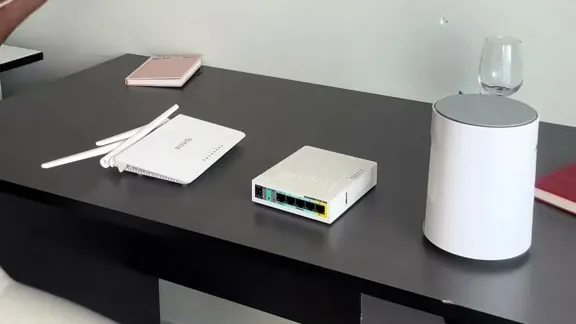
You need a MikroTik router, one or more access points, and Ethernet cable to join them to your internet source. The MikroTik runs the hotspot: it shows the login page, applies each package's speed and time limits, and cuts customers off when their time ends.
- A MikroTik router. The hAP lite is the cheapest MikroTik that does the job for a first site. Our guide to the best MikroTik router for a hotspot compares models by how many users each carries.
- Access points. These carry the WiFi to where customers sit. One thing we wish we'd known earlier: a Tenda F3 router works as an access point. Some operators put several along a route instead of buying two expensive outdoor access points, for a fraction of the money.
- Ethernet cable and connectors. For the links between the internet source, the MikroTik and each access point.
Weighing home connections instead? Read PPPoE vs hotspot first.
Step 4: How do you set up M-Pesa billing for a hotspot?
Connect a billing system that sends an M-Pesa STK push from your login page and activates the customer automatically once they pay. Customers expect to pay KSh 10 or KSh 20 from their phone and be online in seconds. Activating people by hand caps you at the hours you can stay awake.
Sort out payments before you rent premises. When Dennis started, he rented a base before he had a Paybill number. The system he used then couldn't pay into a bank account, so he spent a month looking for a Paybill while paying rent on a place that wasn't earning.
On Bitwave M-Pesa WiFi billing:
- Bitwave configures the MikroTik for you. You reset the router and paste one provisioning command, and the hotspot, login page, packages and M-Pesa flow are set up. See MikroTik hotspot setup in 10 minutes.
- Customers pay with an STK push on the login page and are connected as soon as the payment goes through.
- There is no setup fee. You pay 3% of hotspot revenue, with a KSh 500 monthly minimum. PPPoE users, if you add them later, are KSh 25 per active user a month. Details are on the pricing page.
Step 5: How should you price your hotspot packages?
Start with cheap, short packages, because that's what most customers buy, and add daily and weekly packages for customers who will pay more. In 84,804 hotspot payments on Bitwave over 30 days, KSh 10 was about 1 in 3 purchases, KSh 5 about 1 in 5 and KSh 20 about 1 in 8.
The cheap packages bring the crowd but not most of the money. Daily and weekly packages were only 7 in every 100 purchases, yet brought in 19% of the revenue.
A sensible first menu has a KSh 5 or KSh 10 entry package, a KSh 20 option, a daily package and a weekly package. Price them against what customers already pay for mobile bundles and what any nearby hotspot charges. The full data is in hotspot package prices in Kenya.
Step 6: What backup power does a hotspot business need?
Every device between the internet and the customer needs backup power: the fibre ONT or 4G/5G router, the MikroTik, and each access point. If one goes off, customers still see your WiFi name but get no internet, and some won't come back.
Size a UPS or battery for the outages you found in step 1, then test it: switch off the mains during a quiet hour, connect a phone, and buy a package. The mistakes post shows how to size the battery from your devices' wattage.
Step 7: How do you get your first customers?
Finish and test the network before spending on anything customer-facing. Dennis's second early mistake was renting and decorating a space before the access points and cabling were in, so he paid rent with nothing to sell.
Once it works:
- Buy a package yourself. Pay from your own phone, browse, and check that the session ends when it should.
- Walk the coverage area. Note where the signal drops before customers find out.
- Tell people directly. Talk to the shops, neighbours and people at the stage within range. Put up a sign with the WiFi name and the cheapest package price.
- Keep the login page simple. List the cheapest package first. If the page is slow or confusing, people leave before paying.
- Help smart TV owners. TVs can't open a login page, so show them how to pay for hotspot WiFi on a smart TV.
Do you need a licence to run a hotspot business in Kenya?
The Communications Authority of Kenya (CA) licenses companies that provide telecommunications services, including internet services. Before you start charging customers, check CA's licensing requirements for your setup, since they can depend on how and where you operate. Your upstream provider may also have terms about reselling its connection, so read your contract.
How much can a hotspot business make in Kenya?
A small hotspot in a busy spot can make around KSh 800 a day. One market site we run averaged KSh 862 a day over 30 days, about KSh 26,000 for the month, from 2,068 payments. Location decides your number. The costs are in how much a hotspot business makes in Kenya.
FAQ
How much does it cost to start a WiFi hotspot business in Kenya?
About KSh 20,000 for a minimum first site. Most of it is a one-off spend on a MikroTik hAP lite, an access point, cables and labour; the internet line is paid monthly. The cost breakdown lists each item.
Can I start a hotspot business in Kenya without fibre?
Yes. A Safaricom or Airtel 4G/5G home router can be your internet source, connected to a MikroTik that runs the hotspot. Watch the plan's fair-use limits, and move to fibre when it reaches your area.
Which hotspot package sells the most in Kenya?
KSh 10. In 84,804 hotspot payments on Bitwave over 30 days, about 1 in 3 customers bought the KSh 10 package. Daily and weekly packages sold less often but earned about 19% of the money.
How long does it take to set up the MikroTik for a hotspot?
With Bitwave, under 10 minutes: reset the MikroTik, paste one provisioning command, and the hotspot, login page and M-Pesa payments are configured for you. Running cables and mounting access points takes longer.
Start with billing handled
Bitwave sets up your MikroTik, login page and M-Pesa payments with no setup fee, so you can spend your time on locations and customers. Create a free account and sell your first package from your own phone.
Running an internet business in Kenya?
Bitwave automates billing for 200+ ISP networks: M-Pesa payments, hotspot vouchers, PPPoE and MikroTik management in one dashboard.