Custom Hotspot Login Page: Build Trust Before Customers Pay
If you are planning a custom hotspot login page, focus first on clarity and trust. The page should look current, identify the WiFi service clearly and make the next action obvious before a customer pays. A captive portal is not just a technical gate; for many customers, it is their first direct interaction with your hotspot business.
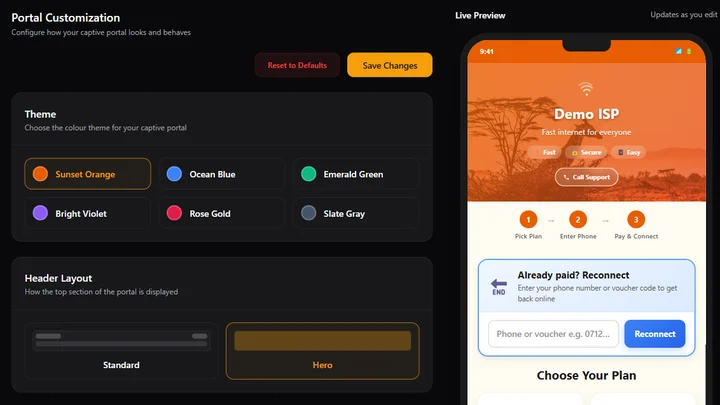
Bitwave Technologies lets an operator choose a portal theme, layout, hero image and welcome message from one settings screen. That gives you a practical way to build a branded captive portal for your hotspot without designing the page from scratch.
What should a custom hotspot login page include?
A custom hotspot login page should identify the service, explain what the customer can buy and guide the customer toward one clear next step. Good design does not mean filling every space. It means using consistent colours, readable wording and a layout that works comfortably on the phone a customer is holding.
| Portal element | What it should do | What to avoid |
|---|---|---|
| Colour theme | Match the identity customers see elsewhere | Several competing colours with weak contrast |
| Header | Name the hotspot or welcome the customer | A generic heading that gives no context |
| Hero image | Add relevant character without covering information | A busy image that makes text hard to read |
| Plan area | Make price, duration and speed easy to compare | Vague plan names with hidden details |
| Main action | Show the next step clearly | Multiple buttons that appear equally important |
| Help text | Explain what to do if payment or reconnection fails | Long technical instructions at the top |
Keep the business name, plan information and main action visible without making the customer hunt. If a customer has to guess whether the page belongs to the hotspot they joined, the design has already created unnecessary doubt.
Why does WiFi login page design affect customer trust?
WiFi login page design affects trust because the portal appears at a sensitive moment: the customer is deciding whether to pay for access. An old-looking, confusing or anonymous page may make the service feel neglected. A clean page cannot guarantee a sale, but it can remove avoidable uncertainty.
This matters especially when the customer has never spoken to the operator. The portal becomes the shopfront, salesperson and payment counter at the same time. Customers may reasonably ask: Is this the correct network? What am I buying? Who will help if something goes wrong? Clear branding and plain instructions answer those questions before they become support calls.
Professional design is not the same as expensive design. Consistency does more work than decoration. Use one main colour family, one style of button, short headings and familiar words. If your service is called “Jirani WiFi,” use that name consistently instead of switching between a router name, company name and estate name across the purchasing flow.
How do you create a custom hotspot login page in Bitwave Technologies?
To create a custom hotspot login page in Bitwave Technologies, open Settings, choose Portal Customization, select a theme and then choose either a Standard or Hero header. If you use a Hero header, select a background and enter a welcome title. Preview the result before saving it.
The portal settings include six colour themes: Sunset Orange, Ocean Blue, Emerald Green, Bright Violet, Rose Gold and Slate Gray. Pick the closest match to your existing identity. The goal is recognition, so avoid changing the colour regularly unless you are correcting a readability problem.
Next, choose the header layout:
- Standard keeps the opening section simple and compact. It suits operators who want customers to reach the available plans quickly.
- Hero gives the portal a stronger visual introduction. It allows a background preset and custom welcome message, which is useful when the hotspot name is an important part of the local brand.
For a Hero layout, choose an image that still leaves the welcome text readable. Enter a short title such as “Welcome to Jirani WiFi.” A subtitle can add one useful instruction, but it should not become a paragraph. Use Preview to inspect the result before selecting Save Changes.
The preview step matters because a choice that looks balanced in a settings form can feel crowded on the actual portal. If you are not yet using the platform, you can create a Bitwave Technologies account and configure the portal alongside your plans and router.
Which design choices work best on customer phones?
The best portal design for customer phones uses large tap targets, short text, strong contrast and a single obvious path to purchase. Most customers will see the page on a narrow screen, sometimes outdoors or on a weak connection, so every decorative element must earn its place.
Check these details:
- Keep the hotspot name and first useful action near the top.
- Use text that remains readable against the selected hero background.
- Write plan names that explain duration or purpose, such as “3 Hours” or “Daily,” rather than internal codes.
- Make prices easy to scan and compare.
- Keep buttons large enough to tap without zooming.
- Avoid images that push every plan below the first screen.
- Provide short help text for failed M-Pesa payments, reconnection or an already-paid device.
- Compress images so the portal loads quickly on affordable Android phones.
Test the result at roughly 360 pixels wide as well as on a larger phone. A portal that looks good on a laptop can still wrap headings badly, clip buttons or hide the plan list on mobile.
What should you test before customers see the portal?
Before customers see the portal, test the complete journey from joining WiFi to reaching the payment, success or reconnection state. Visual polish is useful only when the purchasing path works. Run the test on a phone that is not already authorised so you experience the same flow as a new customer.
Use this checklist:
- Join the hotspot and confirm that the portal opens.
- Check that the business or hotspot name is correct.
- Read every heading and button on a small phone.
- Confirm that each plan shows its intended price, speed and duration.
- Follow the M-Pesa or voucher flow to its final state.
- Test the route for a customer who has already paid and needs to reconnect.
- Try again with slow mobile hardware or a weak WiFi signal.
- Ask someone unfamiliar with the setup to use it without coaching.
Write down every point where the tester pauses or asks what to do. Those moments reveal unclear design more reliably than asking whether the page simply “looks nice.”
How does portal branding fit into a hotspot business?
Portal branding supports the wider hotspot operation by making the customer-facing experience match the service behind it. The router, plans, payments and support process still have to work; design does not replace them. Branding helps customers understand whose network they joined and what happens next.
If you are still assembling the full operation, read the guide to starting a WiFi hotspot business in Kenya. It covers the MikroTik router, access point, internet source, packages and billing workflow that sit behind the login page.
Start with clarity, choose a consistent theme, add a short welcome message and test the complete mobile journey. Change one element at a time so you can tell whether the page became easier or harder to use.
FAQ
What is a custom hotspot login page?
A custom hotspot login page is a captive portal whose colours, header, welcome message and visual layout are configured for a specific WiFi service. It appears when a customer joins the hotspot and guides that customer toward choosing access, paying, signing in or reconnecting.
Do I need coding skills to customise a hotspot login page?
Not when the billing platform provides portal controls. Bitwave Technologies allows an operator to select a colour theme, choose a Standard or Hero layout, pick a hero background, edit the welcome message, preview the page and save the configuration from the dashboard.
Will a better hotspot login page increase sales?
A better login page cannot guarantee higher sales. It can make the service easier to recognise, plans easier to understand and the next step easier to complete. Revenue still depends on location, demand, pricing, network reliability and support, so treat portal design as one part of the whole customer experience.
A clear portal gives every new customer a more confident first interaction with your WiFi business. Review Bitwave Technologies pricing for your network, then build a portal that matches the service you want customers to remember.
Running an internet business in Kenya?
Bitwave automates billing for 200+ ISP networks: M-Pesa payments, hotspot vouchers, PPPoE and MikroTik management in one dashboard.
Start free