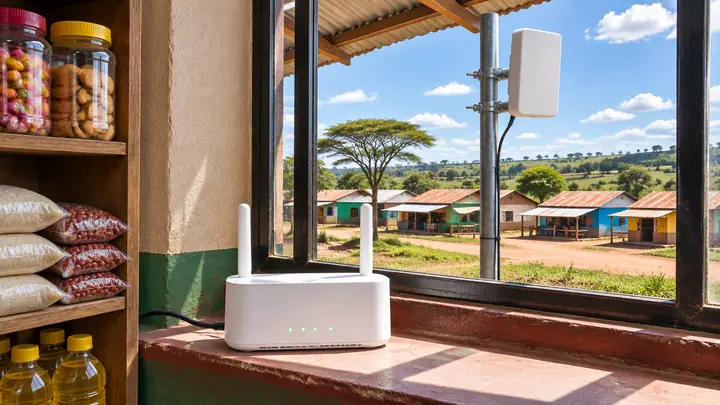
How to Start a Hotspot Business Without Fibre in Kenya
You can start a hotspot business without fibre. If no fibre provider reaches your area, or nobody nearby can supply internet, a Safaricom or Airtel 4G/5G home router can be your internet source. You put a SIM card in it, connect it to a MikroTik, and the MikroTik turns that connection into a hotspot that customers pay for with M-Pesa. In remote areas and small plots, this is how many people start.
It has limits, though, and you should know them before you buy. This guide covers the setup, what to check first, and when it's time to move to a fixed line.
This guide follows our TikTok on starting a hotspot without fibre (in English and Swahili).
The billing side works the same as on fibre. Bitwave hotspot billing runs the login page, M-Pesa payments and package limits on your MikroTik, whatever the internet behind it is.
Can you start a hotspot business without fibre?
Yes. A 4G or 5G home router from Safaricom or Airtel gives you internet from the mobile network, and that's enough to run a small hotspot. It's a common way to start in areas fibre hasn't reached, and in small plots where a fibre line would cost more than the customers would pay for.
The trade-off is that you depend on the mobile signal and on your data plan. Fibre gives you a steady line; a 4G/5G router gives you whatever the nearest tower can spare at that moment.
What do you need to start a hotspot business without fibre?
You need four things: a 4G or 5G home router, a SIM line with a data plan, a MikroTik router to run the hotspot, and a billing system. Add an access point if your customers are spread out beyond the reach of one router.
- A 4G/5G home router. Safaricom and Airtel both sell them. This is your internet source, doing the job a fibre line would do.
- A SIM line and data. The first thing you need is the line itself. Load it with a bundle or plan that suits heavy, shared use.
- A MikroTik. The router that runs the hotspot. A hAP lite is the usual starting point; our post on how many users a MikroTik router can handle helps you size it.
- A billing system. It shows the login page, takes M-Pesa payments and enforces package limits, including how much data each customer can use.
To connect them, run a cable from a LAN port on the 4G/5G router to the internet port (ether1) on the MikroTik. Your access points and customers connect on the MikroTik's other side. The 4G/5G router's own WiFi should not be your customer network, because anyone who joins it skips your login page.
You don't need a public IP address from the mobile network. Bitwave's setup has the MikroTik connect out to Bitwave, so we can manage it behind the mobile network's shared IP the same way we would on fibre.
If you've never set up a MikroTik hotspot, see MikroTik hotspot setup in 10 minutes.
What are the limits of a 4G or 5G hotspot?
The two big limits are data and speed. Many mobile plans cap how much data you can use, and speed changes with your signal and how busy the tower is. Evenings, when everyone nearby is online, are usually the slowest time.
Data limits. If your plan has a cap, a few heavy users can burn through it in days. Use a billing system with a fair use policy (FUP), which slows a customer down after they've used a set amount of data. For example, each customer gets 1 GB at full speed and then drops to 3 Mbps, so nobody gets cut off and nobody eats the whole bundle.
Speed. You can't buy more tower capacity, but you can get more out of the signal you have:
- Put the router high up, near a window.
- Face it towards the tower.
- Test the speed at different times of day before you sell to anyone, especially in the evening.
Your plan's terms. Check them before you buy. Some home internet plans don't allow reselling, and you don't want to build a customer base on a line the provider can cut.
When should you upgrade from 4G/5G to fibre?
Upgrade when the 4G/5G line keeps holding your business back: customers complain about slow evenings every day, you run out of data before the month ends, or you have more customers than the line can serve. The other trigger is simple: fibre or a fixed wireless provider reaches your area.
Before you blame the line, rule out the router. If your bandwidth graph isn't full when things are slow, the MikroTik may be the bottleneck; read why hotspot internet is slow in the evening.
When you do upgrade, nothing else has to change. The MikroTik, the access points, your packages and your customers' M-Pesa payments all stay the same. You unplug the 4G/5G router from ether1 and plug in the new line.
How much does it cost to start without fibre?
The hardware is the same as any small hotspot apart from the internet source. Our itemised starter kit for a small site comes to about KSh 20,000, with the internet line as a monthly cost; the full list is in hotspot business cost in Kenya. With a 4G/5G router, budget for the router itself and your monthly data instead of a fibre installation.
Billing costs the same either way: Bitwave charges 3% of your hotspot revenue with a KSh 500 monthly minimum and no setup fee.
FAQ
Can I use a Safaricom 4G or 5G home router for a hotspot business?
Yes. Connect it to a MikroTik and run your hotspot on the MikroTik. Check your plan's terms first, because some home plans don't allow reselling, and expect speeds to drop when the tower is busy.
Why is my 4G hotspot slow in the evening?
Speed on a 4G/5G router depends on your signal and how busy the tower is, and evenings are when the most people nearby are online. Move the router high, near a window, facing the tower, and use FUP so a few heavy users don't slow everyone else.
Do I need a MikroTik if I already have a 4G router?
Yes, if you want to sell internet. The 4G router gives you the connection; the MikroTik shows customers the login page, applies each package's time and speed limits, and cuts them off when their package ends.
Start with the line you have
No fibre doesn't have to mean no business. Get your 4G/5G router and a MikroTik, then create a free Bitwave account and we'll set up the hotspot and M-Pesa payments on your MikroTik. You can add FUP limits to your packages from the dashboard. When fibre reaches your area, you just swap the line.
Running an internet business in Kenya?
Bitwave automates billing for 200+ ISP networks: M-Pesa payments, hotspot vouchers, PPPoE and MikroTik management in one dashboard.