M-Pesa WiFi Hotspot: How Customers Pay and Get Online in 30 Seconds
An M-Pesa WiFi hotspot lets a customer buy internet from their phone with no voucher, no agent and no call to you. They connect to your WiFi, pick a package, approve an M-Pesa prompt, and the router lets them online. To see how fast that is, we bought a KSh 1 package on camera. It took about 30 seconds.
Here's every step the customer sees, what you need behind it, and what it costs. If you already run a hotspot, you can connect M-Pesa to your MikroTik with Bitwave without writing any router commands.
This post is based on our TikTok buying WiFi for 1 shilling.
How does an M-Pesa WiFi hotspot work?
An M-Pesa WiFi hotspot joins three things: a login page on your WiFi, an M-Pesa STK push, and a billing system that controls your MikroTik router. The customer pays on the login page. When M-Pesa confirms the payment, the billing system tells the router to let that device online for the package it bought.
Nobody on your side does anything. You don't read an M-Pesa message, and you don't type a code into a router. On Bitwave, that whole chain is what M-Pesa WiFi billing means: the payment switches the customer on.
What does a customer do to pay for WiFi with M-Pesa?
The customer picks a package, confirms their phone number, taps pay, and enters their M-Pesa PIN on the prompt that appears. The Bitwave login page shows this as three numbered steps: Pick Plan, Enter Phone, Pay & Connect. Our test package was KSh 1 for 10 minutes.
This is what happened in the video, in order:
- Join the WiFi. The phone connects and the login page opens, showing your business name and your packages.
- Pick a package. The customer taps the one they want and moves to the payment page.
- Check the number. If the customer has bought before, the page has already filled in their number, so there's nothing to type.
- Tap pay. The page changes to "Check Your Phone" and tracks the payment.
- Approve on M-Pesa. The Safaricom prompt comes up and the customer enters their PIN.
- Get online. The page changes to "You're Online!" and the internet works.
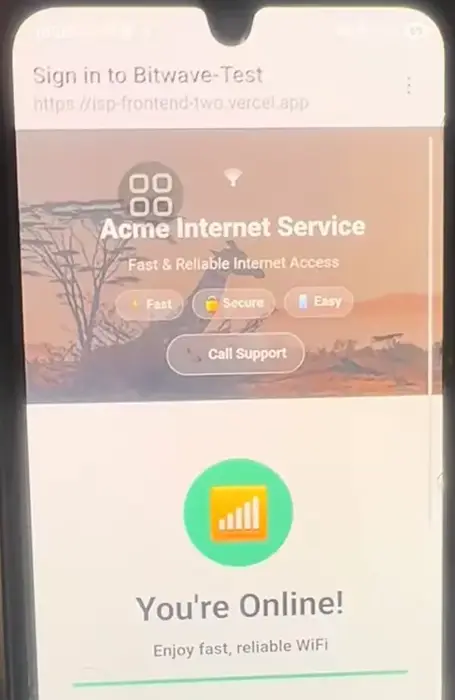
Most of those 30 seconds is the wait for Safaricom. The customer only taps twice and enters a PIN.
How long does an M-Pesa hotspot payment take?
Our KSh 1 purchase took about 30 seconds from choosing the package to being online, on a real phone with a real M-Pesa prompt. Timing depends mostly on how quickly Safaricom sends the prompt and how quickly the customer enters the PIN.
It won't always be that fast, and the page says so. While it waits, the screen tells the customer that confirmation can take up to a minute or two and asks them not to pay again. That one line matters, because a customer who thinks nothing is happening may pay twice and then call you about it.
Why does a fast payment matter for a hotspot business?
Hotspot customers buy small and buy often, so every purchase has to be easy. In 84,804 hotspot payments we analysed, 1 in 3 customers bought the KSh 10 package and 3 in 4 purchases were for 4 hours or less. A customer on short packages repeats this flow again and again.
So any friction costs you more than it looks. If buying is slow, or a customer has to find you to get a code at 11 PM, that KSh 10 sale may not happen at all. With an automatic flow, your hotspot keeps selling while you sleep.
What do you need to run an M-Pesa WiFi hotspot?
You need an internet line, a MikroTik router, a way to receive the money and a billing system that links them. You don't need your own M-Pesa API account. With Bitwave, the money can come through Bitwave and be paid out to your paybill, Buy Goods till or bank account.
| You need | Details |
|---|---|
| Internet line | Fibre, or a 4G/5G home router where there is no fibre |
| MikroTik router | From the hAP lite and RB951 up to the hEX and larger models |
| Somewhere to receive money | M-Pesa paybill, Buy Goods till or bank account |
| Billing system | Runs the login page, the STK push and the router |
There are two ways to set up the money side, and you choose in Settings → Payment Methods:
- Payouts. Customers pay through Bitwave, and your earnings go to your paybill, till or bank account.
- M-Pesa Direct. You connect your own M-Pesa API keys and business shortcode, so the STK push runs on your own paybill.
Not sure which M-Pesa account to get? We compare them in M-Pesa till or paybill for a hotspot.
What happens if a customer pays but doesn't get online?
The customer can use the "Already paid? Reconnect" box on the login page instead of paying again. On your side, each payment appears on your transactions page with the time, amount and customer, and any payment that doesn't match goes to the Unmatched Payments screen until you assign it.
Payments made with the wrong account number or from someone else's phone aren't lost. They wait on that screen, and the customer is connected as soon as you assign the payment to them.
If the customer's phone says connected but pages won't load, the payment may not be the problem at all. Our guide to a hotspot that is connected but has no internet covers the usual causes.
What does an M-Pesa WiFi hotspot cost to run on Bitwave?
Bitwave charges 3% of your hotspot revenue with a KES 500 monthly minimum. There's no setup fee and no separate M-Pesa integration fee, and installation and MikroTik configuration are free. On KES 30,000 of monthly hotspot sales, that's KES 900.
Below about KES 16,700 of monthly sales, the KES 500 minimum applies instead of the 3%. You can work out your own bill on the pricing calculator using your expected sales.
FAQ
Can a customer buy hotspot WiFi for as little as KSh 1?
Yes. We bought a KSh 1 package for 10 minutes in the video, using a real M-Pesa prompt. You set your own packages and prices on Bitwave, so the lowest price on your login page is your decision.
Do customers need an app to pay for WiFi with M-Pesa?
No. The login page opens in the phone's browser when the customer joins your WiFi, and the M-Pesa prompt comes from Safaricom. If it's their second purchase, the page has their number ready too.
Can customers pay for WiFi on a smart TV with M-Pesa?
Yes. A TV can't easily show the payment page, so the customer registers it from a phone using its MAC address and pays there. Our guide on how to pay for hotspot WiFi on a smart TV has the steps.
Try it on your own hotspot
The fastest way to judge this flow is to pay on your own WiFi and time it. Create your free Bitwave account, and we'll set up your MikroTik at no charge so you can run your first KSh 1 test.
Running an internet business in Kenya?
Bitwave automates billing for 200+ ISP networks: M-Pesa payments, hotspot vouchers, PPPoE and MikroTik management in one dashboard.